
All your wishes, in one place
Create a list, add gift ideas from any website, share it with a single link. Your loved ones reserve gifts, with no duplicates and no account needed.
Looking for a loved one's list?
Type the title of a list, the first and last name of the person who created it, or their full email address.
Completely free, for you and your loved ones
How it works
A list ready to share in three steps
-
1
Create a list
Give it a name, a date if it's for an event, and choose whether it's public or private.
-
2
Add your gifts
Paste a product link: name, price and photo are fetched for you. Or add it in one click right from the shop with the browser extension, or by hand.
-
3
Share the link
Send it in a message. Your loved ones open the list and reserve their gift: everyone sees what's already taken.
-
They open the link
No app to install, no account to create.
-
They reserve a gift
The gift shows as “Already reserved” for everyone else.
-
They keep track of their reservations
With an account, “My reservations” gathers everything, list by list.
For your loved ones
No more duplicate gifts
Everyone sees in real time what's left to give. No need to coordinate in a group chat: pick, reserve, done.
And also
-
Public or private
A private list is only visible with its link. A public list appears on your profile.
-
Following
Follow your loved ones: their new lists are waiting for you in your following feed.
-
Search
Find a loved one's public lists by their name or email.
-
Ideas for later
A private list also works as a reminder for your own future purchases.
Add a gift
Adding a gift, made simple
Three ways to fill your list, whatever your habits: paste the product link, add it straight from the shop with the extension, or type it in by hand.
With a link
One link is all it takes
Spotted a gift in an online shop? Copy the page address and paste it into hYune: the details fill themselves in. All that's left is to check them and pick a list.
- Works with most online shops
- Photo, price and currency can be edited before saving
- Available from each of your lists or from “My account”
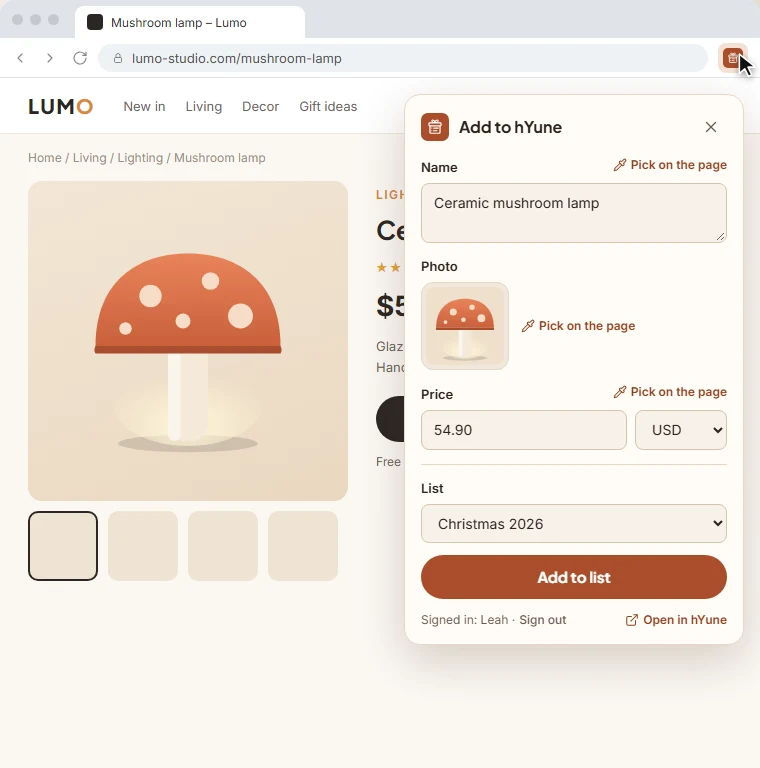
Add gifts without leaving the shop
Click the hYune icon while you browse: the product shows up, pick a list, done. If a detail is missing, point it out on the page with the picker.
No link? Add it by hand
A homemade gift, an experience, a local shop: enter the name, the price and a photo if you have one.
For every occasion
A list for every moment
- Baby registry Get ready for baby without receiving three breast pumps.
- Wedding registry A modern wedding registry that doesn't tie you to one store.
- Christmas list The letter to Santa, shared with the whole family.
- Birthday wish list Gifts people actually love, at any age.
- Housewarming registry Furnish your new home with help from your loved ones.
- Wish list All your wishes in one place, all year round.
Frequently asked questions
Is hYune free?
Yes, completely. Creating lists, adding gifts, sharing, reserving: it's all free, for you and your loved ones.
Do my loved ones need an account?
No. They can view your list and reserve a few gifts without an account. With an account, they can also cancel a reservation and find all their reservations on any device.
Who can see my list?
A public list appears on your profile and in search. A private list is only accessible to the people you send its link to.
Can I add a gift from any website?
Yes. Paste the link: most websites are read automatically. If a site blocks reading, the browser extension takes over, or you fill in the details by hand.
Next occasion coming up?
Your list is ready in a minute. All that's left is to send the link.
Create my list